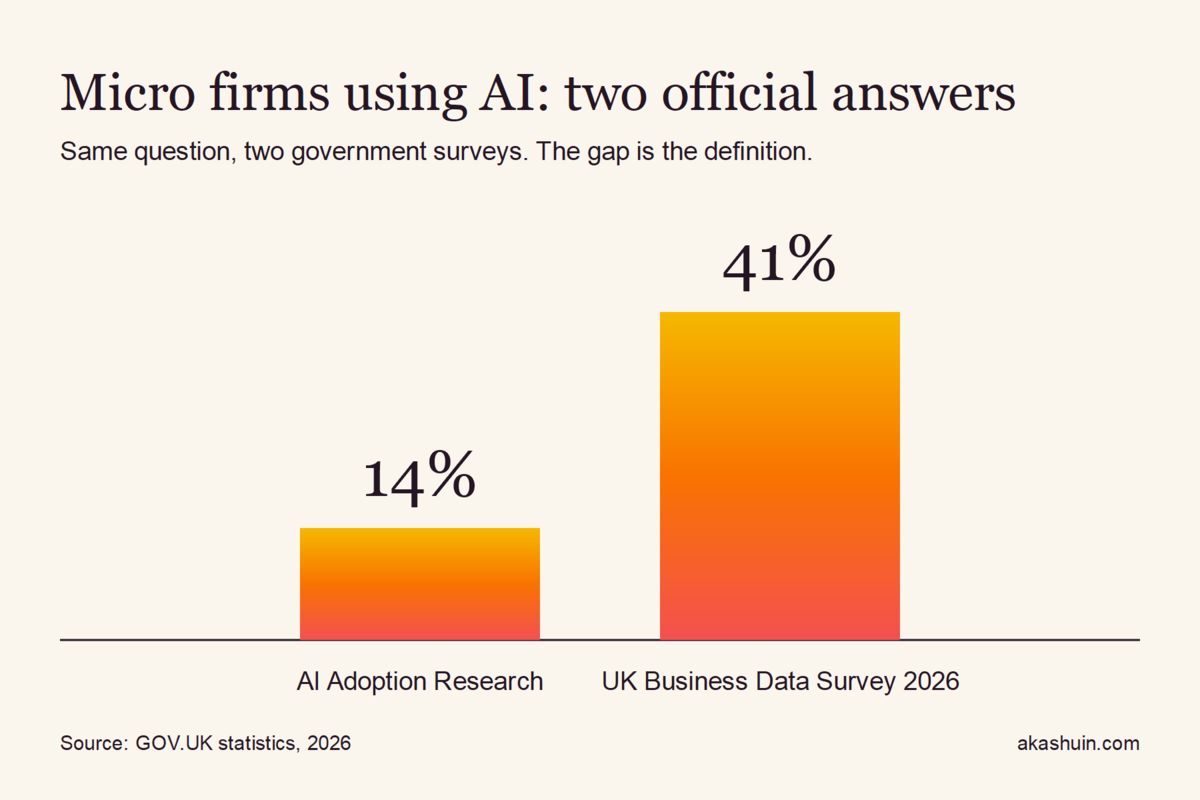
Ask two official UK reports how many micro firms use AI and you get 14% in one and 41% in the other. The gap is not a mistake. It comes down to what counts as “using AI”, and it tells you something useful: if the statisticians cannot agree, most firms cannot say how much time AI actually gives back.
The AI Adoption Research report from GOV.UK puts current use among micro businesses at 14%, against 16% across all businesses. The UK Business Data Survey 2026 puts micro businesses at 41%. The survey’s own authors note that differences in how AI use is defined make adoption hard to measure consistently. So a firm that says “we use AI” could mean one person with a chatbot open on a laptop. It could also mean an invoice chaser that runs every night without anyone touching it. Those are not the same business.
The time figures are real, but read the source first
The number people quote most this year is 2.5 hours. Dell Technologies published research, with fieldwork by FocalData, which found that UK SME decision-makers report AI saving an average of 2.5 hours per employee each week. Of the 2,013 SME respondents, 7% count as “AI front-runners” and say they save six or more hours a week. The article does not say which tasks the time came from.
Treat that as a vendor number. Dell sells the hardware and services that AI runs on, so it has every reason to make the savings look large. It is still the only time-saved figure I could find for UK small firms, which makes it a good hypothesis to test in your own business, not a promise to bank.
The ONS July 2026 article offers a clue about where those hours might sit. Its analysis of AI in UK businesses finds that improving operations is the most common use across every size band, at close to 60%. Operations is not the glamorous bit. It is scheduling, chasing, copying data from one system into another, and writing the same follow-up email for the fortieth time. That is where most service firms lose a surprising share of their week.
Why most firms never see the hours
Here is the pattern I see with clients. Someone buys a tool, uses it for drafting, and calls that AI adoption. Nobody counts the hours before or after, so nobody knows whether anything changed. The time saved only shows up when a workflow changes, not when a tool gets opened.
There is a second trap. Automation that runs without anyone checking it can go quietly wrong for weeks. A commentator on Substack who goes by Calvin, and does not list any professional background, makes the point bluntly in his piece on what is actually working in 2026: automation with no review loop fails. He is right, and I would go further. Anything that sends a message, books a slot, raises an invoice or changes a record needs a human checkpoint until it has weeks of clean output behind it.
If you cannot name the hours AI gave back this month, you have a tool, not a system.
Try this: a one-afternoon hour audit
You do not need a consultant or a new platform to find your own numbers. You need a spreadsheet and about an hour. Here is the method I use.
- List every repeated task. Spend 45 minutes writing down everything you or your team does every week: chasing invoices, booking calls, writing quotes, updating the CRM, sending reminders. Aim for 20 rows. Do not filter yet.
- Estimate minutes per week for each row. Guess first. Then check one week against your calendar and your sent folder. Most people underestimate the admin by about a third.
- Score the risk. For each row, ask one question: if this goes wrong on a Friday afternoon, what does it cost? A missed payment or a wrong price on a quote is expensive. A badly worded internal note is not. Put a high, medium or low against each row.
- Automate the top low-risk row, and only that row. Pick the task with the most minutes and the lowest risk. Build the automation with a human approval step before anything reaches a customer. Your first build should take about half a day, not a month.
- Measure for four weeks. Track minutes spent on that task and count any errors. If minutes fall and errors stay flat, add the next row. If errors rise, switch the approval step back on and fix the cause before going further.
The point of the audit is not to find a magic number. It is to stop treating AI as something you own and start treating it as a set of tasks you have measured. Your first win will be small. That is fine. A row that saves 90 minutes a week, every week, is worth more than a demo that impressed everyone on the call.
If you would rather not run the audit yourself, this is exactly where we start on process automation work: the same list, the same risk scoring, then one workflow built first with the checkpoints in place. You keep the spreadsheet either way.
The conclusion the official figures point to
The 14% and 41% argument will run on in government reports, and it does not matter much for your firm. Your question is simpler. Pick one repeated task this week, measure it honestly, and check whether anything changed by the end of the month. Count tasks and minutes, not logins. The firms that can show their hours are the ones that will still be using AI next year, because they will know it works.
Leave a Reply