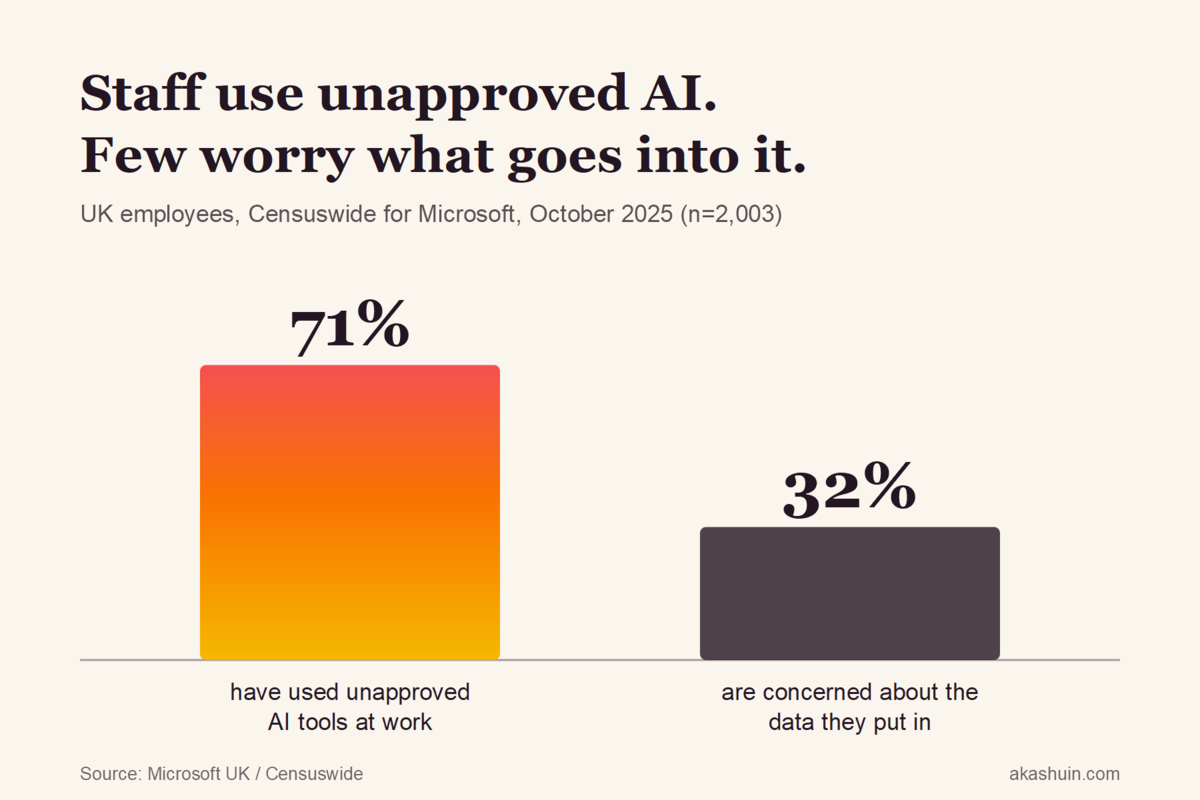
Seven in ten UK employees have used an AI tool at work that their employer never approved. Only a third of them are worried about the client data they are feeding it. If you run a small agency or practice, assume that includes your team, and assume some of your clients’ information is already sitting in a free chatbot account you have never seen.
That is not a scare line. It is what the numbers say when you put two recent studies side by side.
What the research actually found
Microsoft commissioned Censuswide to survey 2,003 UK workers in October 2025. 71% had used unapproved consumer AI tools at work, and 51% still do so every week. The uses are exactly what you would expect: 49% drafting emails and replies, 40% writing reports and presentations, and 22% on finance tasks. Only 32% said they were concerned about the privacy of the customer or company data going in.
Now look at the other side of the desk. The government’s Cyber Security Breaches Survey 2025/26, published in April, found that 31% of UK businesses are using AI, adopting it or actively considering it. Of that group, just 24% have any cyber security practice in place to manage the risks from AI. The same survey found 46% of small businesses and 42% of micro businesses had a breach or attack in the last twelve months.
Put those together and you get the real picture. Staff are using AI far more than their employers think, the employers who do know about it mostly have no rules, and the people typing are not worried. A separate survey of over 1,000 UK decision-makers this month found 88% believe unapproved AI is in use in their business and 51% fear staff are pasting sensitive data into it. Worth flagging that one came from an automation vendor with something to sell, but it lines up with everything else.
Why your team does it
Nobody on your team is being reckless for the fun of it. Microsoft asked why they use unapproved tools. 41% said it is what they already use in their personal life. 28% said their employer does not provide an approved alternative.
That second number is the one I keep coming back to. In most of the small firms I work with, nobody has decided anything about AI. There is no policy, no paid account, no guidance. So a junior account manager with a deadline opens the ChatGPT tab they use for meal plans and pastes in the client brief. The work gets done faster, the client is happy, and the brief now lives in a consumer account that may be used to train future models, tied to a personal email address you have no control over.
Shadow AI is not a discipline problem. It is what happens when a business leaves a gap and a deadline fills it.
A practitioner writing on The Product Journey makes the point well: you cannot govern what you cannot see, and visibility has to come before any rule. Banning tools outright tends to push usage further underground, where it is harder to find.
The specific risks for a small firm
For an agency, accountancy practice or law firm, the exposure is concrete:
- Client confidentiality. Most engagement letters and NDAs promise you will not share client information with third parties. A free AI account is a third party.
- UK GDPR. If personal data goes into a tool with no data processing agreement, you are the controller and you cannot say where it went. That is a hard conversation with the ICO and a harder one with a client.
- Leaving staff. When someone leaves, their personal AI account leaves with them, complete with months of chat history about your clients.
- Bad output nobody checked. Unapproved use usually means unreviewed use. A hallucinated figure in a client report is your problem, not the chatbot’s.
None of this means AI is the enemy. Microsoft’s own figures put the time saved at nearly eight hours a week per worker on admin. The goal is to keep that benefit while closing the gap.
Try this: a one-week shadow AI fix
You do not need an IT department for this. Here is what I would do in a firm of five to fifty people.
1. Run a no-blame AI amnesty (Monday, 15 minutes). Send a short form: which AI tools do you use for work, what for, and what kind of information goes in? Say clearly that nobody is in trouble and the point is to get them better tools. You will be surprised by the answers, and that survey alone tells you where your real risk sits.
2. Buy the business version of whatever they already use (Tuesday). If the answers say ChatGPT, get ChatGPT Team or Enterprise. If they say Copilot, check what your Microsoft 365 licence already includes, because many firms are paying for protected Copilot Chat and not using it. Business tiers typically exclude your data from model training and give you an admin console. This removes the 28% reason overnight: there is now an approved alternative, and it is the tool people already like.
3. Write a one-page traffic-light rule (Wednesday). Not a twelve-page policy nobody reads. Three lines:
- Green: public information, your own drafts, generic questions. Any approved tool.
- Amber: client names, internal financials, project details. Company accounts only, never personal ones.
- Red: personal data about individuals, anything under NDA, passwords, bank details. Not into any AI tool without sign-off.
4. Close the personal accounts (Thursday). Ask everyone to move work chats into the company account and delete work content from personal ones. Add “AI accounts” to your leaver checklist so it happens every time someone goes.
5. Check it in a month (put it in the diary now). Re-run the form. If people are still reaching for unapproved tools, find out what the approved one is missing and fix that, rather than adding another rule.
If you would rather have someone do the discovery, test what your tools are actually doing with data and write the rules for you, that is what an AI security audit produces. But the steps above will get most small firms most of the way there in a week.
The bottom line
Three quarters of the UK businesses engaging with AI have no rules for it, and seven in ten workers are already using it anyway. The firms that get hurt here will not be the ones that used AI. They will be the ones that pretended their team was not using it. Pay for the tool, write the one page, and make the safe option the easy one. That is cheaper than any conversation you will have after a client’s data turns up somewhere it should not be.